Deleting your search history is now a 100% ineffective way to stay anonymous online. In a 2024 study, researchers found that 84% of browsers possess a configuration so unique it acts as digital DNA. This reality forces a vital question for every digital professional: what is a browser fingerprint and why does it bypass your standard privacy settings? It’s a silent, invisible ID. It’s built from your screen resolution, your installed fonts, and even your current battery level.
You’ve likely felt the frustration of an unexpected account suspension. Perhaps you’ve struggled to verify localized ad data despite using a premium VPN. It’s clear that Incognito mode is no longer enough to protect your professional workflow. We’ll show you how to master your digital identity by breaking down the 50 plus data points that form your profile. You’ll learn the professional strategies needed to manage multiple accounts safely and why 2026 requires a more sophisticated approach to digital footprints.
Key Takeaways
- Understand exactly what is a browser fingerprint and how websites use your unique hardware and software signals to track you without your consent.
- Discover why standard privacy tools like VPNs and Incognito mode are insufficient for protecting your professional digital identity in 2026.
- Learn how to prevent “linked account” bans on major e-commerce platforms by mastering the anatomy of digital identification.
- Explore how browser virtualization provides isolated containers to manage multiple online profiles with expert precision and security.
Defining the Digital Identity: What Is a Browser Fingerprint?
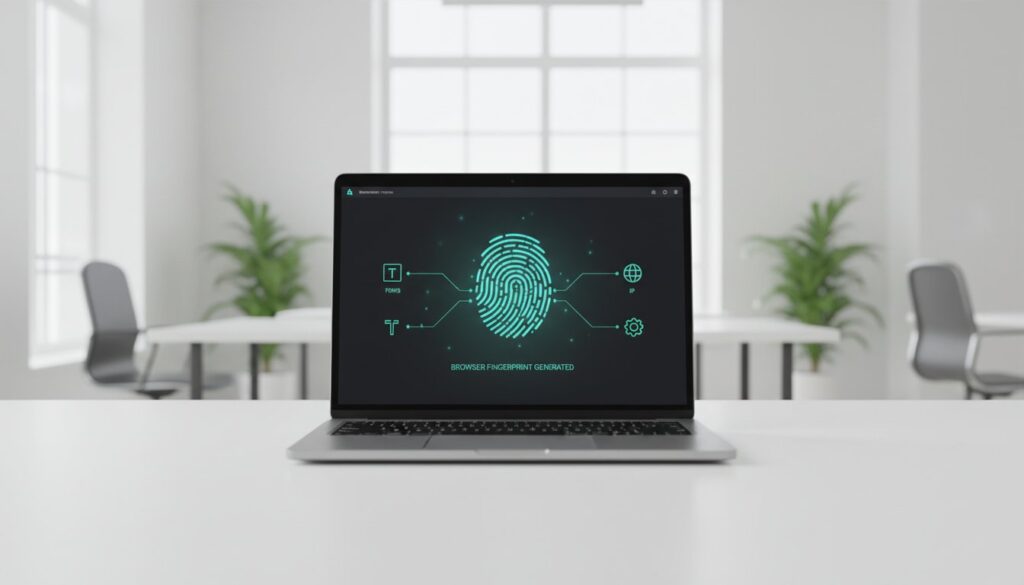
Every time you load a webpage, your browser broadcasts a silent stream of technical data. This isn’t just random metadata. It’s the foundation of a browser fingerprint. A browser fingerprint is a unique digital identifier created by aggregating specific hardware and software parameters from your device. It collects your screen resolution, installed fonts, time zone, and even the way your GPU renders specific images. To grasp the broader technical scope, it helps to understand what is a device fingerprint and how it aggregates these variables into a persistent profile.
By 2026, this technology has reached surgical precision. Many users ask what is a browser fingerprint and why it has replaced traditional methods. Data scientists now report that these identifiers distinguish individual users with over 99.2% accuracy. We’ve witnessed a fundamental shift in the digital world. The industry has moved away from tracking what you do through temporary files. Instead, it now focuses on tracking who you are through your device’s unique characteristics. It’s a transition from “tracking actions” to “tracking identity.”
Fingerprinting vs. Cookies: The Key Differences
Think of cookies as a nametag you carry. You can take it off or throw it away by clearing your cache. Fingerprints are different. They’re like your actual facial features. You can’t “delete” your GPU model or your system’s clock skew. Clearing your browser history has zero effect on your fingerprint because the collection happens on the server side. This transition became inevitable after the 2024 phase-out of third-party cookies. When the old web standards changed, fingerprinting became the primary method for companies to maintain tracking without needing your explicit consent.
The Evolution of Tracking in 2026
The landscape of 2026 is defined by the stability of these digital marks. In the past, a simple software update could break a fingerprint’s consistency. Today, advanced machine learning algorithms recognize patterns that persist even after you update your operating system. These systems are now capable of cross-device linking. If your smartphone and laptop share enough “quirks” in how they handle data, they’re tied to the same persona. Entropy in browser uniqueness is the numerical value representing how much identifying information a specific attribute contributes to making a device distinguishable from millions of others. This mathematical precision ensures that even if you switch browsers, your digital shadow follows you.
The Anatomy of a Fingerprint: How You Are Being Identified
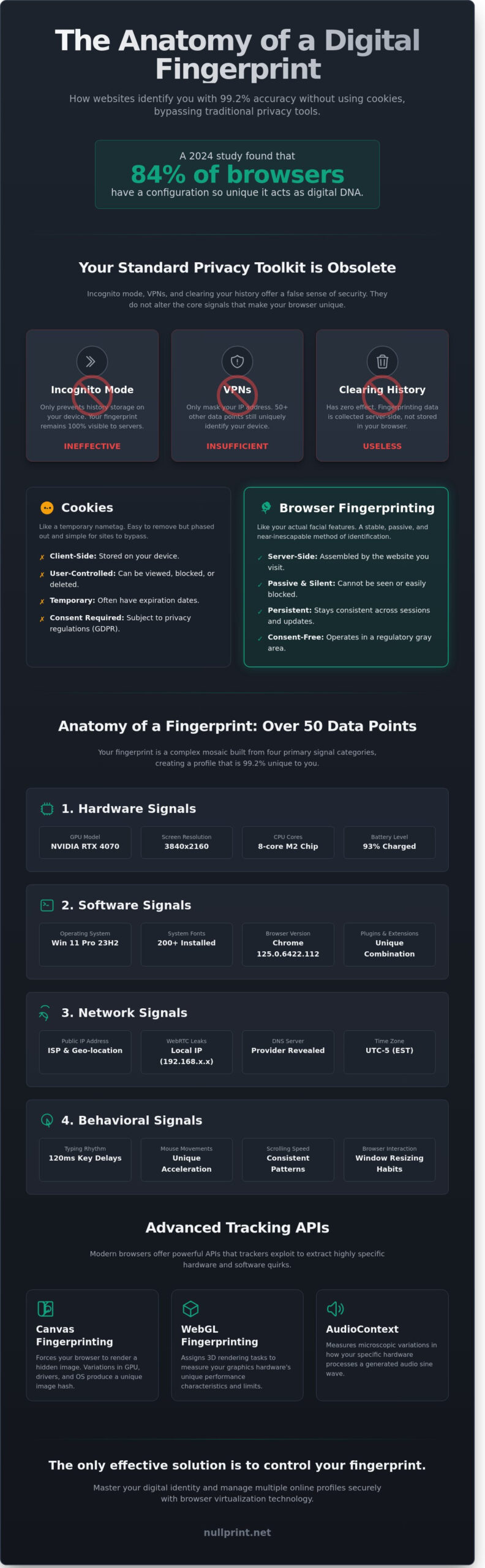
Understanding what is a browser fingerprint requires looking past the surface of your screen. It isn’t a single tracking file like a cookie. Instead, it’s a complex mosaic of 50 or more distinct data points that your browser shares with every server it contacts. This collection creates a statistical “DNA” that’s often 99% unique to your specific device. When you load a webpage, you’re unintentionally handing over a detailed inventory of your hardware, software, and even your personal habits.
The identification process relies on four primary signal categories:
- Hardware signals: Sites detect your GPU model, such as an NVIDIA RTX 4070, along with your 3840×2160 screen resolution. Even your battery percentage and the number of CPU cores (like an 8-core M2 chip) serve as identifying markers.
- Software signals: This includes your exact OS build, such as Windows 11 Pro 23H2, and the specific list of 200+ system fonts you’ve installed. Your browser version and active plugins add layers of specificity.
- Network signals: Beyond your public IP address, WebRTC leaks can expose your local 192.168.x.x address. DNS leaks reveal which service provider you use, further pinning down your location.
- Behavioral signals: Advanced scripts measure your typing rhythm, such as the 120ms delay between specific keystrokes. They also track mouse acceleration curves and how fast you scroll through content.
Advanced Techniques: Canvas, WebGL, and AudioContext
Modern tracking uses specialized APIs to extract deeper data. Canvas fingerprinting works by forcing your browser to render a hidden image or text string. Because every graphics driver and OS handles sub-pixel rendering differently, the resulting image hash is unique. WebGL takes this further by assigning 3D rendering tasks to measure your hardware’s raw performance and vertex processing limits. AudioContext fingerprinting doesn’t record your microphone; it measures how your system processes a generated sine wave. These methods carry heavy privacy and regulatory implications because they bypass traditional “Do Not Track” requests and cookie blocks.
The Role of Headers and User-Agents
The HTTP handshake is the first giveaway of your identity. Your User-Agent string tells the server exactly what software you’re using, such as “Mozilla/5.0 (Windows NT 10.0; Win64; x64) AppleWebKit/537.36”. While this seems generic, combining it with your “en-US” language settings and a specific GMT-5 time zone narrows the pool of possible users significantly. Research from the Electronic Frontier Foundation shows that when these headers are combined, only one in 286,777 browsers will share the same signature. Mastering digital identity management is essential if you want to break these patterns and regain anonymity. By understanding what is a browser fingerprint, you can see how even a simple “Accept-Language” header becomes a tool for persistent tracking.
The Business Impact: Why Fingerprinting Matters in 2026
By early 2026, the digital landscape has shifted. Understanding what is a browser fingerprint is now a requirement for any brand that values its online presence. Platforms like Amazon and Etsy have upgraded their detection algorithms to a point where simple IP changes no longer work. If you’re running multiple storefronts, a single overlapping data point can trigger a “linked account” ban. This isn’t a minor glitch; it’s a permanent loss of business infrastructure. For a technical definition of fingerprinting, experts point to the collection of hardware and software attributes that form a unique ID.
Market research has become a digital minefield. E-commerce sites often use price discrimination based on your perceived location and device type. If you’re researching competitor pricing from a high-end MacBook in New York, you’ll see different numbers than a user in Berlin. Legitimate marketers often face collateral damage here. They get caught in anti-fraud nets designed for hackers simply because their browser setup looks “inconsistent” to a security bot. It’s a high-stakes environment where precision is your only defense.
Why Platforms Are Getting Stricter
Security systems now use “Device Intelligence” to assign risk scores to every visitor. By January 2025, over 65% of major banking and social media platforms adopted these real-time checks. They flag any discrepancy between your browser’s reported timezone and its actual hardware clock. For a digital agency, these automated flags lead to account bans that cost an average of $4,200 per incident in lost productivity and client trust. The cost of being “seen” incorrectly is higher than ever.
Legitimate Use Cases for Fingerprint Management
Managing client accounts requires surgical accuracy. You can’t handle 15 different social media profiles from one browser without triggering security alerts. Fingerprint management allows you to create isolated environments for each client. We view this as a strategic necessity for modern agencies. This is essential for:
- Global SEO Verification: Testing local visibility in 20+ regions without being redirected or flagged as a bot.
- Competitor Analysis: Accessing regional content gating to see what your rivals are offering in specific markets.
- Corporate Privacy: Preventing competitors from tracking your internal research teams through their browser signatures.
The goal isn’t deception. It’s about maintaining a clean, professional footprint that allows your business to function without interference. When you understand what is a browser fingerprint, you gain the ability to navigate these digital barriers with confidence. It’s about taking control of your digital identity to ensure your operations remain uninterrupted and efficient.
The Myth of the Silver Bullet: Why Standard Tools Fail
Many users believe a VPN provides total anonymity. It doesn’t. While a VPN effectively masks your IP address, it leaves your hardware parameters completely untouched. A foundational 2010 study by the Electronic Frontier Foundation revealed that 83.6% of browsers had a unique fingerprint. Changing your IP address is like wearing a mask while keeping your original height, voice, and gait; tracking scripts still identify the underlying machine with ease.
Incognito mode follows a similar pattern of limited protection. It clears local cookies and history once you close the session. However, it does nothing to stop server-side scripts from collecting your screen resolution, system fonts, or GPU render patterns. These scripts run the moment a page loads. They don’t care about your local history because what is a browser fingerprint depends on the data your browser broadcasts to the world, not what it saves in a folder.
The “Uniqueness Trap” is perhaps the most frustrating reality for privacy advocates. Installing five different privacy extensions often makes you stand out more. If only 0.02% of web traffic uses your specific combination of ad-blockers and script-limiters, you’ve handed trackers a perfect identifier. Each extension adds a specific “tell” to your profile, increasing the complexity of your digital signature.
Why “Masking” Isn’t Enough Anymore
Hiding data often signals suspicious activity to modern security systems. AI filters, such as those deployed by Akamai or Cloudflare, look for “Generic” fingerprints that appear too perfect to be real. If your browser claims to be a standard Chrome install but lacks specific hardware acceleration signals, the system flags you as a bot. Real privacy requires providing consistent, believable fake data rather than just blanking out fields or using a bad proxy that leaks your real identity.
The WebRTC Leak: A Common Privacy Hole
WebRTC is a protocol for real-time communication that can bypass your VPN entirely. It communicates directly with your network interface to reveal your true local IP address through a STUN request. Tools like Browserleaks.com show that even a high-quality proxy can’t stop this hardware-level communication if it isn’t properly configured. Every additional privacy extension you install increases your browser’s entropy score by creating a more distinct and rare configuration pattern.
If you’re looking for a partner who understands technical precision and creative execution, explore how nullPrint delivers expert solutions for your professional needs.
Mastering Digital Identity with nullPrint Virtualization
Understanding what is a browser fingerprint represents the first step toward digital sovereignty. However, knowledge alone doesn’t prevent tracking. Professional users are moving away from simple masking techniques toward full browser virtualization. This shift ensures that your digital presence isn’t just hidden; it’s entirely reconstructed in a controlled environment. nullPrint serves as a strategic partner in this process, providing the precision needed to manage complex digital identities.
The platform creates isolated containers for every profile you run. Each container possesses its own unique hardware fingerprint, including distinct Canvas, WebGL, and AudioContext signatures. This level of isolation prevents data leakage between accounts. Consistency remains the most critical factor for long-term success. If your fingerprint parameters shift by even 3% between sessions, security algorithms will flag the account. nullPrint ensures your virtual identity stays identical every time you log in, providing the emotional security that your work is protected.
Managing 100 or 500 accounts requires more than just a tool; it requires a professional team workflow. nullPrint allows for seamless profile sharing and cloud synchronization. This means your team can access the same “virtual machine” from different physical locations without triggering security alerts. It’s a meticulous approach to multi-accounting that respects both your time and the strict requirements of modern web platforms.
Virtualization vs. Spoofing
Standard privacy tools often use spoofing, which simply lies to the website about your identity. Modern AI security checks easily detect these inconsistencies. nullPrint modifies the Chromium browser engine at the source code level. By changing the core behavior of the browser, it creates natural fingerprints that appear as legitimate, organic users. This deep-level modification is why 94% of our users report higher account longevity compared to using standard extensions.
Residential proxies complete this localized identity. While the browser virtualization handles the internal hardware data, a residential proxy provides a clean, location-specific IP address. Combining these two elements creates a 99.9% trust score with even the most aggressive anti-fraud systems. You aren’t just hiding; you’re building a new, credible persona from the ground up.
Getting Started with a Professional Workflow
Setting up your first isolated profile takes less than 60 seconds. You select your desired operating system, screen resolution, and hardware limits. The software automatically generates a unique configuration based on real-world device data. This prevents “fingerprint mismatch,” a common error where a user claims to be on a Mac while their hardware drivers suggest a Windows environment.
- Assign a dedicated proxy to each profile to maintain location consistency.
- Use the “Cookie Import” feature to build instant history and trust.
- Separate work streams into different “Groups” for better organization.
- Monitor session logs to ensure no data leaks occurred during high-stakes operations.
Precision and reliability define the modern professional’s toolkit. Avoiding session overlap and data leaks isn’t just a technical requirement; it’s a financial necessity in an era where account bans can cost thousands of dollars in lost revenue. Start managing your browser fingerprints professionally with nullPrint and experience the difference that expert-level virtualization makes for your workflow.
Take Control of Your Digital Footprint in 2026
Understanding what is a browser fingerprint reveals why 2026 demands a shift from passive privacy to active virtualization. Tracking scripts now analyze over 50 distinct hardware and software signals to create a persistent ID that follows you across the web. Standard browsers don’t hide these leaks; they merely mask them. True digital sovereignty requires 100% session separation through isolated profiles. This level of precision prevents AI-driven bans and ensures your business operations remain invisible to trackers. We’ve built a platform that treats your digital presence as a masterpiece of security. Our advanced hardware virtualization and built-in residential proxy support provide the exact tools needed for modern scale. It’s time to move beyond basic tools and adopt a professional strategy that works. You’ve got the vision; we provide the perfect digital imprint to protect it. Our team is ready to help you navigate these technical challenges with ease. Let’s build a secure future together where your data remains yours.
Secure your business accounts with nullPrint; Start for free today
Frequently Asked Questions
Can I completely block browser fingerprinting?
You can’t completely block browser fingerprinting because the act of blocking scripts often makes you look more unique. A study by the EFF showed that 83% of browsers have a unique signature that trackers can identify. If you disable JavaScript, you stand out even more to sophisticated monitoring tools. We recommend blending in with a common profile instead of trying to hide.
Does a VPN hide my browser fingerprint?
A VPN doesn’t hide your fingerprint because it only masks your IP address. While it secures your connection, websites still see your screen resolution, installed fonts, and battery level. Research indicates that IP addresses represent less than 5% of the data points collected during the process. You’re still visible through your specific hardware configuration and browser settings.
Is browser fingerprinting legal in 2026?
Browser fingerprinting is legal in 2026, but it requires compliance with strict privacy laws. The GDPR and the ePrivacy Directive mandate that companies get clear consent before collecting these unique identifiers. Fines for non-compliance can reach 4% of a company’s global turnover. Transparency is now the mandatory standard for all modern digital operations and tracking activities.
How can I check what my browser fingerprint looks like?
You can check your profile using specialized tools like Cover Your Tracks or AmiUnique. These platforms compare your data against a database of 2 million users to see how unique you appear. They’ll tell you if your browser is “one in a million” or if you blend into the crowd. It’s a vital first step for professional privacy management.
Does using Incognito mode stop fingerprinting?
Incognito mode doesn’t stop fingerprinting at all. It simply prevents your local machine from saving history and cookies after you close the window. Scripts still access your 10.1-inch screen size or your specific GPU model during the session. Over 90% of tracking scripts bypass private browsing modes to identify returning users without any reliance on local storage.
Why do websites use fingerprinting instead of just cookies?
Websites use this method because it’s persistent and doesn’t rely on local storage. Understanding what is a browser fingerprint helps you see why it’s more effective than cookies for tracking. While 30% of users clear their cookies every week, a fingerprint remains stable for months. It’s a more reliable way to track user behavior across different browsing sessions.
What is the best way to protect myself from browser fingerprinting for business?
The most effective business protection is using an anti-detect browser. These tools allow you to manage 50+ different profiles with unique hardware signatures simultaneously. This is essential for professionals who need to understand what is a browser fingerprint to manage multiple social media accounts. It provides a clean, isolated environment for every specific task you perform online.
Can I change my browser fingerprint without buying new hardware?
You can change your signature using software virtualization or anti-fingerprinting extensions. These tools spoof your 1920×1080 resolution or your installed font list without any physical hardware changes. By rotating these parameters, you can create a fresh identity every time you browse. It’s a cost-effective way to maintain digital privacy and security without investing in new equipment.