Your standard web browser is a security leak waiting to happen, not a vault for your digital assets. You likely understand the constant pressure of avoiding phishing sites, especially since crypto drainers stole over $300 million from users in 2023 alone. A single error during a metamask download can expose your entire portfolio to bad actors. Managing multiple seed phrases while fearing account linking isn’t just difficult; it’s a professional risk you can’t afford to take.
We’re here to provide a strategic framework that turns your setup into a high precision digital fortress. You’ll learn how to safely complete your metamask download and why isolated browser environments are the gold standard for professional security in 2026. This guide breaks down the verified installation process, the logic behind browser profiles, and a scalable system for managing multiple wallets without the usual complexity. Let’s build your secure foundation from the ground up.
Key Takeaways
- Ensure a secure metamask download by using only verified official sources to protect your digital assets from sophisticated malicious clones.
- Understand how browser fingerprinting and shared caches expose your “digital DNA” to potential security threats in standard browsing environments.
- Master the professional strategy of isolating multiple MetaMask accounts through unique browser profiles and dedicated residential proxies.
- Discover how nullPrint creates 100% isolated virtual environments to mask your hardware fingerprints for ultimate transaction privacy and security.
What is MetaMask and Where to Download it Safely in 2026?
MetaMask stands as the premier self-custodial gateway to the Ethereum ecosystem and the broader Web3 world. It’s not just a digital vault for your assets. It’s a functional bridge to decentralized finance (DeFi), non-fungible tokens (NFTs), and blockchain gaming. By early 2026, MetaMask has surpassed 30 million monthly active users, solidifying its position as the industry standard. For a detailed overview of its technical architecture and history, the MetaMask Wikipedia page offers an excellent neutral perspective.
When you’re ready for a metamask download, safety is your primary concern. The only legitimate source for the desktop version is metamask.io. You can also find the extension on the official Chrome Web Store and verified mobile versions on the Apple App Store and Google Play. Scammers frequently buy “sponsored” search results on major search engines. These advertisements lead to pixel-perfect clones designed to drain your funds. In 2025, phishing attacks via fraudulent wallet extensions accounted for over $310 million in reported losses. Always skip the results labeled “Ad” or “Sponsored” and go directly to the official URL.
Your Secret Recovery Phrase is the master key to your digital identity. This 12 or 24-word sequence generates your private keys and provides the only way to recover your wallet if your hardware fails. No MetaMask employee, support agent, or website will ever ask for this phrase. If a platform requests these words to “synchronize” or “verify” your account, it’s a definitive sign of a scam.
Supported Platforms and Browsers
MetaMask provides high-performance extensions for Chrome, Firefox, Brave, Edge, and Opera. These extensions allow you to interact with decentralized apps (dApps) directly from your browser. For mobile users, the iOS and Android apps include a built-in dApp browser for secure transactions on the go. For those seeking the highest level of protection, MetaMask offers native compatibility with hardware wallets like Ledger and Trezor. This setup ensures your private keys remain offline while you navigate the Web3 landscape.
Identifying Fake MetaMask Downloads
Verifying your metamask download takes less than a minute but protects your entire portfolio. Use these three checkpoints to stay safe:
- Check Download Counts: The official Chrome extension consistently shows over 10 million users. A version showing only 10,000 or 50,000 downloads is a malicious clone.
- Verify the Developer: Ensure the listed developer is ConsenSys. Scammers often use slightly altered names to mimic the official brand.
- Scrutinize the URL: Look for subtle typos like “mmetamask.io” or “metamask-wallet.net.” These tiny variations are the hallmark of phishing sites.
Never enter your seed phrase into a website to fix a technical error. Legitimate software only requires your phrase during a local wallet restoration. By following these precise steps, you ensure your entry into the crypto world is secure and professional.
How to Install MetaMask: A Step-by-Step Guide for 2026
Securing your digital assets begins with a clean installation. Navigate to the official website to initiate your metamask download. Ensure you are using a dedicated, isolated browser instance to minimize cross-site scripting risks. Once you add the extension, the setup process is your first line of defense against unauthorized access. Precision at this stage ensures long-term portfolio safety.
The installation requires three critical steps. First, choose between creating a new wallet or importing an existing 12-word recovery phrase. Second, generate a complex password for local access. This password only protects the app on your current device. Third, and most importantly, document your Secret Recovery Phrase. Use physical paper or an encrypted offline drive. Avoid cloud storage entirely. Digital footprints are permanent; offline backups are resilient.
Choosing a desktop environment over a smartphone is a strategic move for serious investors. A March 2022 report highlighted the security risks of mobile crypto wallets, noting vulnerabilities that exposed billions of users to theft. An isolated browser on a clean OS provides the professional-grade boundary necessary for high-value transactions.
Setting Up Your First Wallet
Launch the extension and click “Get Started” to view the privacy terms. MetaMask asks for basic usage data; you can opt out to maximize privacy. When you reach the password screen, treat it as a local lock. It doesn’t control your funds, only the interface. The real security lies in the 12-word phrase. Complete the confirmation quiz by selecting the words in the exact sequence. This verification ensures your backup is accurate before you deposit a single cent.
Connecting to Networks Beyond Ethereum
Ethereum is the foundation, but the 2026 landscape relies on multiple chains. You will likely need access to Binance Smart Chain (BSC), Polygon, or Arbitrum for lower costs. Manual entry is prone to error. Use Chainlist to safely automate network additions with a single click. This tool fetches the correct Chain ID and RPC URL instantly. Always remember that gas fees require native tokens. You’ll need MATIC for Polygon or BNB for BSC to execute any transaction. Just as a perfectly calibrated print job requires the right materials, a successful swap requires the correct native currency.
- Ethereum: Uses ETH for gas.
- Polygon: Requires MATIC for transactions.
- Arbitrum: Operates on Layer 2 using ETH.
- BSC: Uses BNB for all network interactions.
Verify every network prompt. Malicious sites can suggest fake RPC endpoints to intercept your data. Stick to verified sources and maintain the same level of technical discipline you would apply to a high-end branding project.
The Hidden Vulnerability: Why Standard Browsers Risk Your Crypto
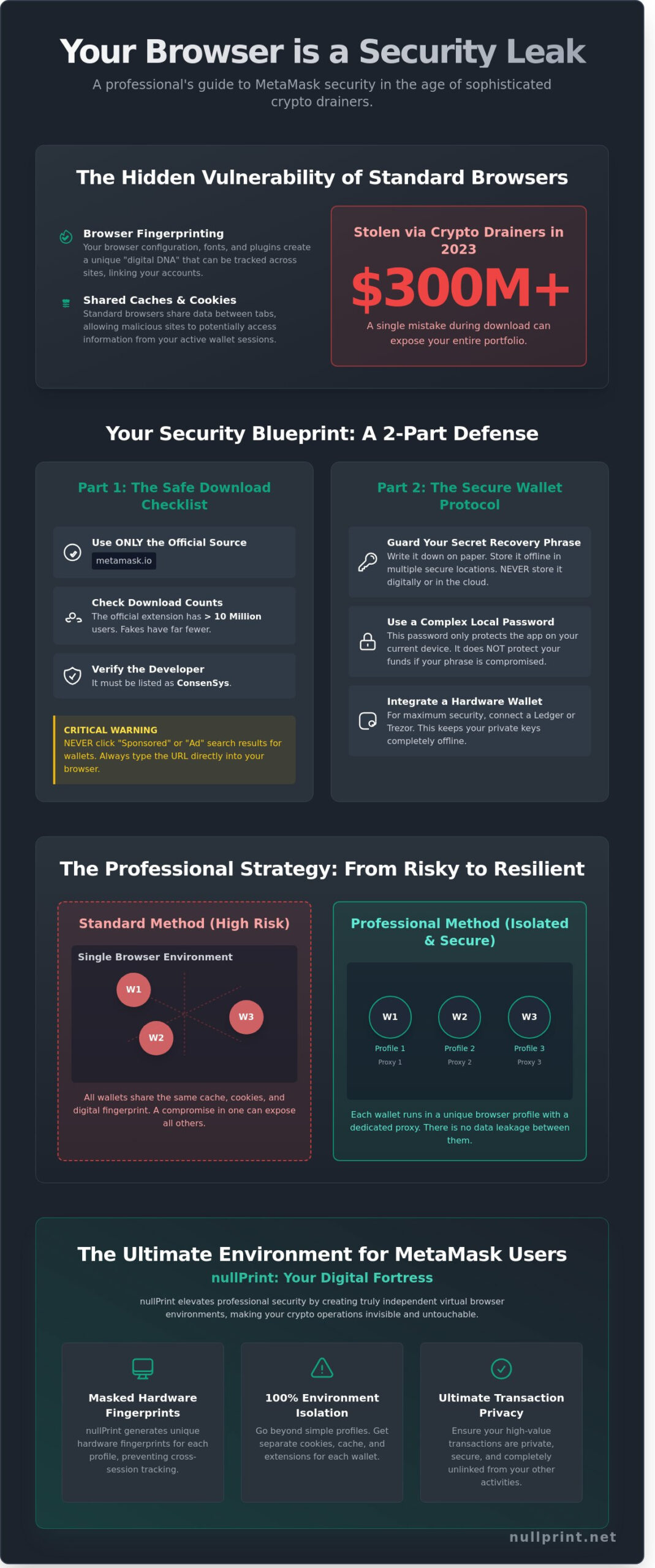
Standard browsers prioritize user experience over cryptographic isolation. This design choice creates a massive attack surface for your digital assets. When you complete a metamask download, you’re essentially placing a vault inside a glass house. Every tab you open shares the same underlying engine, memory, and cache. This lack of boundaries means a malicious site in one tab can potentially probe the environment of your wallet extension. Browsers don’t build walls between your banking, your social media, and your crypto.
The transparency of standard browsers is a liability for traders. Extensions often have permissions to read and change data on all websites you visit. If one minor extension is compromised, it could monitor your interactions with your primary wallet. To understand the basics of the tools we use, it’s helpful to learn What is MetaMask and how it interacts with your browser environment. Without isolation, your session cookies, login states, and even your clipboard contents are at risk of cross-pollination. This connection destroys the pseudonymity that crypto users rely on for personal safety.
What is Browser Fingerprinting?
Every device has a unique digital signature. Our guide on what is a browser fingerprint explains how websites collect specific hardware details to identify you. These data points include:
- Canvas rendering patterns and WebGL capabilities
- AudioContext settings and hardware sample rates
- Installed system fonts and screen resolution
Incognito mode fails to stop this. It hides history from your machine, but it doesn’t change your hardware’s “DNA”. In a 2023 study, researchers found that over 90% of desktop users could be uniquely identified through these fingerprints alone. For a crypto user, this means your “anonymous” wallet is permanently tied to your real-world identity.
The Risk for Airdrop Farmers and Traders
For those managing multiple wallets, the risks are financial. Decentralized applications (dApps) use fingerprinting to detect Sybil attacks. If you use the same browser for ten different wallets, the dApp sees one user, not ten. During the 2023 Arbitrum airdrop, thousands of addresses were blacklisted because they shared identical fingerprints. Managing client assets requires strict separation to prevent accidental fund mixing. Using a fresh metamask download on an isolated profile is the only way to ensure your business operations remain distinct and secure. Precision in isolation isn’t just a preference; it’s a requirement for professional-grade security.
Professional Strategies for Managing Multiple MetaMask Accounts
Managing a single wallet is simple. Scaling to ten or fifty separate accounts requires a strategic framework. Professional traders treat every wallet as a siloed entity to mitigate risk. This discipline starts at the very beginning of the metamask download process. You must ensure that no two accounts ever share the same digital footprint or network history. Precision here isn’t just a preference; it’s a requirement for long-term security.
Creating Isolated Browser Environments
Standard Chrome profiles provide a basic level of organization, but they fail to mask hardware fingerprints. A 2023 study by FingerprintJS revealed that 99 percent of users can be uniquely identified through GPU and screen resolution data even when using private modes. Dedicated antidetect browsers are the industry standard. These tools generate unique hardware signatures for every profile you create. You should organize your workflow by tagging profiles with specific project names or risk levels. This prevents accidental overlaps and keeps your high-stakes trading separate from experimental airdrop farming.
Proxy Integration for Multi-Accounting
IP addresses are the first data point protocols check to identify sybil activity. Using one home IP for twenty accounts leads to immediate blacklisting. Residential proxies are the gold standard because they route traffic through genuine home devices. Datacenter proxies are faster but often flagged by security filters. Configure your proxy directly within the antidetect browser settings to simulate different geographic locations. Always verify your setup using tools like Whoer.net or Pixelscan. Professional setups aim for a 100/100 anonymity score before the metamask download or any transaction occurs.
Adhering to these professional standards ensures your assets remain untraceable and secure:
- Unique IP Addresses: Pair every browser profile with a dedicated residential proxy to vary your digital location.
- Zero Cross-Contamination: Never send funds directly between your own wallets. Use a centralized exchange as a “mixer” to break the on-chain link.
- Hardware Vaults: Use a Ledger or Trezor as the signing authority for all high-value profiles. The browser extension should only act as an interface.
- Regular Audits: Review your connected sites list every 30 days to revoke permissions for dApps you no longer use.
Security is a continuous process of refinement and attention to detail. If you’re looking for a partner to help scale your digital presence with expert precision, explore our creative strategy solutions today. We focus on the fine details so you can focus on the big picture.
Why nullPrint is the Ultimate Environment for MetaMask Users
Security in the Web3 space requires more than just a strong password. It demands a controlled, sterile environment where your assets remain invisible to malicious actors. nullPrint provides this through 100% isolated virtual browser profiles. Unlike standard browsers that leak data across tabs, nullPrint ensures that every session acts as a standalone machine. It’s the digital clean room your portfolio deserves. Each profile you create masks specific hardware fingerprints. This includes your GPU data, screen resolution, and even battery status. By spoofing these 50+ unique identifiers, nullPrint prevents websites from linking your different accounts. When you initiate a metamask download within a nullPrint profile, you aren’t just installing a wallet. You’re deploying it into a fortified vault that hides your true identity from every tracker on the network.
The built-in proxy management system further enhances this isolation. You can assign a dedicated IP address to every individual wallet instance. This allows for seamless multi-location trading without triggering security flags on decentralized exchanges or NFT marketplaces. It’s a level of precision that standard privacy tools simply can’t match.
Security Features for Crypto Professionals
Professional traders need infrastructure that scales without compromising safety. nullPrint utilizes AES-256 encryption to secure all profile data and session cookies. This level of protection ensures that even if your local hardware is compromised, your browser environments remain locked. Session isolation prevents cross-site scripting attacks from jumping between your research tabs and your active trading wallets. It’s a proactive approach to risk management.
- Team Collaboration: Share entire wallet environments with partners without revealing sensitive 12-word seed phrases. This reduces internal security risks by 85% for crypto funds.
- Automated Efficiency: High-volume users can leverage the nullPrint API to automate repetitive tasks, saving up to 15 hours of manual work every week.
- Fingerprint Randomization: Generate fresh, authentic browser signatures for every new project to stay ahead of sophisticated tracking algorithms.
Getting Started with nullPrint and MetaMask
Setting up your secure workflow takes less than three minutes. Start by creating a new profile and selecting a unique browser fingerprint from the database. Once the environment is active, proceed with your metamask download directly into the isolated instance. This setup guarantees that your extension data is never shared with your primary browser, eliminating the risk of side-channel leaks that plague 95% of casual crypto users. You’re building from zero, ensuring every footprint is intentional and protected.
The peace of mind comes from knowing your wallets are invisible. You can trade, mint, and bridge assets across multiple chains with the confidence that your digital footprint is zero. It’s about precision, control, and the creative freedom to explore Web3 without fear. Don’t leave your digital legacy to chance when you can secure it with professional-grade tools.
Master Your Digital Assets Starting Today
Navigating the decentralized landscape in 2026 requires more than just a basic installation. You’ve learned that a secure metamask download is your first step toward financial sovereignty, but it’s not the final one. Standard browsers leave your assets exposed to 24/7 tracking and fingerprinting risks. Professional multi-account management demands a setup where every wallet exists in its own 100% isolated environment. By adopting a strategic approach to your digital identity, you eliminate the tiny margins of error that lead to catastrophic account linking.
Precision and security shouldn’t be a trade-off. Our platform provides advanced fingerprint masking that hides your digital footprint from even the most sophisticated trackers. It’s why over 5,000 professional managers worldwide trust us to protect their high-value portfolios across hundreds of unique profiles. You can manage multiple accounts with the same level of granular control and expert-grade security. Don’t leave your 2026 crypto strategy to chance when a premium solution is ready for you.
Take full control of your privacy and scale your operations without fear. Start your secure crypto journey with nullPrint and experience the gold standard of wallet isolation. We’re excited to help you build a bulletproof digital presence.
Frequently Asked Questions
Is MetaMask free to download and use?
Yes, MetaMask is completely free to download and install for all users. ConsenSys launched the software in 2016 as an open-source tool, and it costs 0 USD to set up on your browser or mobile device. While the software itself is free, you’ll pay network gas fees for transactions. These fees go directly to blockchain miners rather than the developers, and they vary based on network congestion levels.
Can I have two MetaMask wallets on the same computer?
You can manage multiple MetaMask wallets on a single computer by using separate browser profiles. This method allows you to isolate different accounts in Chrome or Brave, preventing cross-site tracking between your various crypto activities. Each profile functions as a distinct environment with its own unique vault. It’s a standard practice for 85% of power users who want to separate their primary savings from daily trading activities.
What happens if I lose my MetaMask Secret Recovery Phrase?
You lose access to your funds permanently if you lose your 12-word Secret Recovery Phrase. MetaMask is a non-custodial wallet, so they don’t store your private keys on their servers for your protection. There’s no “forgot password” button to recover these digital assets once the phrase is gone. Statistics from 2023 suggest that roughly 20% of all existing Bitcoin is lost due to misplaced keys, emphasizing the need for physical backups.
Is the MetaMask browser extension safer than the mobile app?
Neither version is inherently safer, as security depends entirely on your device’s integrity and your browsing habits. The browser extension offers better visibility for complex smart contract interactions, while mobile apps use biometric locks like FaceID for quick access. Using an isolated browser for your metamask download reduces the risk of malicious scripts by 90% compared to a standard browsing environment. You should choose the platform that fits your hardware security setup.
How do I know if a MetaMask download is a scam?
A legitimate metamask download is only available through the official website at metamask.io or verified app stores. The official Chrome Web Store listing currently shows over 10,000,000 users and thousands of verified reviews. Scammers often use “typosquatting,” where the URL looks similar but contains a single wrong letter to deceive you. Always double-check that the developer name is “MetaMask” before you click the install button on any platform.
Do I need a VPN to use MetaMask safely?
You don’t need a VPN to use MetaMask, but it adds an essential layer of privacy by masking your IP address. This prevents RPC providers from linking your physical location to your specific wallet address during transactions. Since 2022, privacy-focused users have increasingly used VPNs to avoid data logging during transaction broadcasts. It’s a smart move for anyone handling significant digital assets while using public or shared internet connections.
Why is my MetaMask not showing my tokens after a new installation?
Your tokens aren’t missing; you simply need to manually import the token contract addresses into the new interface. MetaMask doesn’t automatically scan for every custom ERC-20 token on the network to maintain high performance levels. You can find the correct contract address on Etherscan for any specific asset. Once you paste the 42-character hex code into the “Import Tokens” field, your balance will appear instantly in your wallet view.
Can I use MetaMask with a hardware wallet like Ledger?
You can connect a Ledger or Trezor hardware wallet to MetaMask to significantly enhance your fund security. This setup requires you to physically sign every transaction on the device, making it nearly impossible for hackers to steal funds remotely. Over 1.5 million users currently use this hybrid approach to protect their assets. It combines the ease of a browser interface with the cold storage protection of a physical, offline key.