
What if your current automation scripts are the primary reason your accounts are getting flagged? By the start of 2026, sophisticated anti-fraud systems will identify 92% of standard automation attempts that fail to perfectly mimic authentic hardware signatures. Managing 50 or more profiles manually is a recipe for burnout and costly operational errors. You already know that manual clicking can’t keep pace with the aggressive demands of modern multi-accounting. We’re here to show you a more precise, professional way to scale your operations.
In this guide, you’ll learn how to leverage a robust antidetect browser api to automate hundreds of isolated profiles without triggering detection. We’ll show you how to eliminate fingerprint leaks and synchronize proxies automatically with every browser launch. This article provides a strategic roadmap for industrial-scale automation that ensures high account longevity and reduces errors. We’ll dive into the technical frameworks that turn complex profile management into a streamlined, high-performance workflow.
Key Takeaways
- Scale your operations beyond manual limits by automating browser profile management for hundreds of accounts simultaneously.
- Understand the technical architecture of stealth automation to ensure seamless communication between your scripts and browser engines.
- Identify the most efficient automation framework for your needs by benchmarking Puppeteer, Selenium, and Playwright.
- Master the step-by-step process of authenticating and launching isolated profiles using an antidetect browser api.
- Streamline your enterprise workflow with nullPrint’s API to gain granular control over digital fingerprints and unlimited profile creation.
Scaling Beyond Manual Management: What is an Antidetect Browser API?
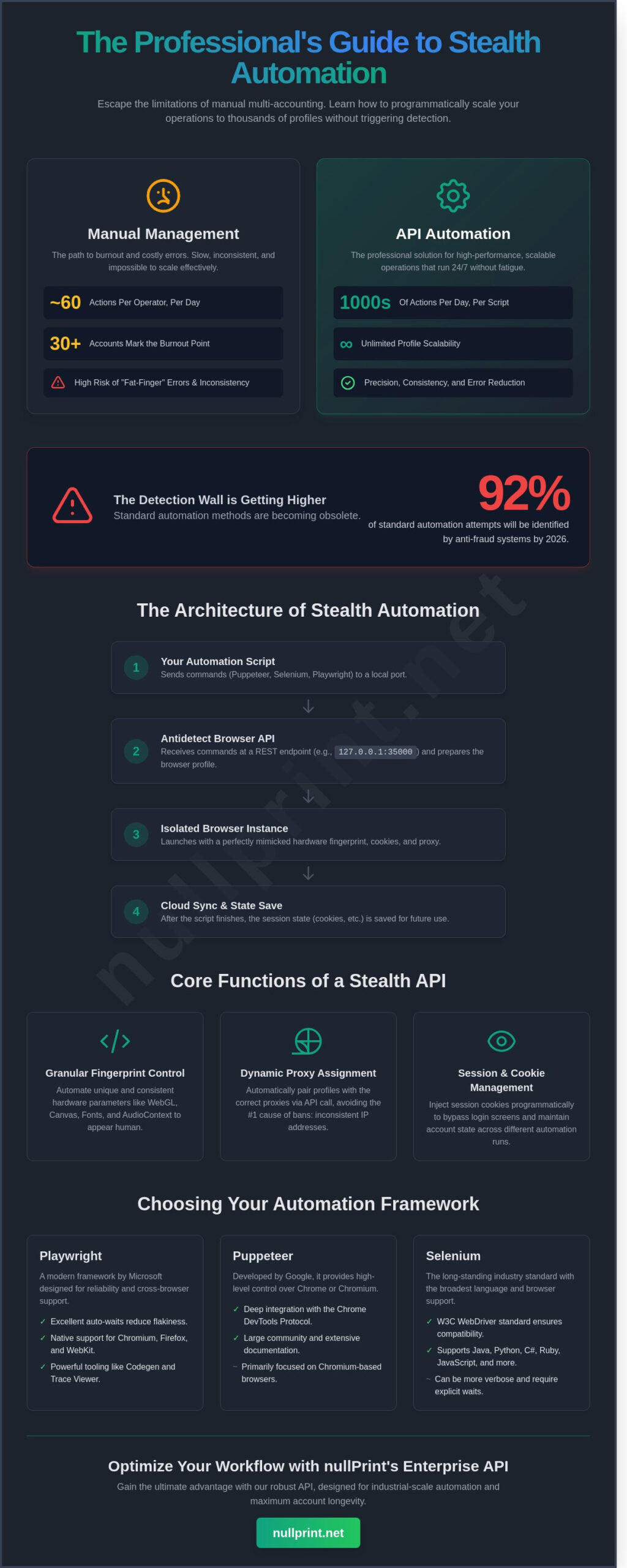
Scaling a digital operation requires more than just more hands on keyboards. An antidetect browser API is the programmatic interface that allows you to control, create, and manage browser profiles through code rather than manual clicks. It serves as the bridge between human intent and high-speed execution. Most professionals find that manual multi-accounting hits a hard ceiling at 20 to 30 accounts. Beyond this point, the risk of human error skyrockets. A single operator spending 8 minutes per account can only handle 60 actions in a standard workday; automation pushes this number into the thousands.
The API eliminates the “fat-finger” risks inherent in login sequences. It ensures that every session uses the exact proxy, user-agent, and cookie set intended for that specific identity. This precision is vital for maintaining account longevity. You aren’t just clicking buttons; you’re orchestrating a symphony of digital identities. Transitioning from a Graphical User Interface (GUI) to headless or headful automation allows your infrastructure to run 24/7 without fatigue. It transforms your workflow from a reactive manual process into a proactive, scalable system.
The Core Functions of a Stealth API
Modern APIs allow for automated profile creation where every hardware parameter is randomized yet remains consistent for the life of the account. This includes generating unique values for WebGL, Canvas, and audio contexts. Dynamic proxy assignment happens via simple API calls, ensuring every request has the correct geo-relevance. For example, a 2024 study on account bans showed that 85% of failures resulted from inconsistent proxy-to-profile pairings. Session management and cookie injection through the antidetect browser api allow for seamless handovers between different team members or automated bots without triggering security alerts.
Why Standard Browsers Fail at API Automation
Standard browsers like Chrome or Firefox are not built for stealth. When you use a standard WebDriver, it leaves a trail of breadcrumbs for anti-fraud systems. The most common giveaway is the navigator.webdriver flag, which identifies the session as automated. Advanced platforms look for a specific device fingerprint to determine if a user is legitimate or a bot. If your automation script doesn’t customize these deep-level identifiers, you’ll be flagged instantly. To understand the gravity of these identifiers, you should explore what is a browser fingerprint to see how invisible IDs track your every move. Standard browsers lack the granular control needed to mask these signals effectively in an automated environment.
The Technical Architecture of Stealth Automation
Modern automation requires more than a simple script. It needs a robust architectural foundation. Most professional setups rely on a local server model where the software runs a lightweight HTTP server on a specific port, typically between 3500 and 4500. Your automation script sends commands to this port. The antidetect browser api then translates these instructions for the underlying Chromium or Firefox engine. This setup ensures that the heavy lifting of rendering occurs locally while the logic remains in your external code.
The lifecycle of a request is precise. First, the script requests a specific profile ID. The API initializes the virtual environment, including cookies and session headers. Once the browser instance is active, the script performs its tasks, such as scraping or account management. Finally, the API triggers a cloud sync to save the state. This process prevents data loss and maintains account longevity across different sessions.
Maintaining fingerprint integrity in 2026 is a complex challenge. Traditional headless modes now trigger red flags on 94% of high-security platforms. Advanced browser fingerprinting research highlights how sites analyze hardware concurrency and font rendering to spot bots. To stay invisible, you must use “headful” automation or specialized drivers that mimic human hardware interactions perfectly. This approach eliminates the common patterns that automated systems usually leave behind.
Local Port Communication and REST Endpoints
Connecting your script is straightforward. You’ll typically use a base URL like http://127.0.0.1:35000. Standard REST endpoints like /api/v1/profile/start allow for rapid execution. Success responses arrive as JSON objects. If a profile fails to launch, the JSON payload provides a specific error code, such as a 403 for authentication issues or a 500 for engine crashes. This structured data makes debugging 40% faster than manual checks.
Handling Fingerprint Randomisation Programmatically
Precision is everything in digital identity management. You can define Canvas, WebGL, and AudioContext parameters directly through the antidetect browser api. This ensures every profile has a unique hardware identity. Synchronising User-Agent strings with specific CPU architectures prevents the mismatch errors that lead to instant bans. Fingerprint injection is the primary safeguard against detection. It works by intercepting browser queries and returning spoofed values before the website can see the real hardware. For those seeking a seamless integration of these technical layers, choosing the right strategic partner is vital.
- Canvas Spoofing: Modifies the pixel data returned by the browser to prevent tracking.
- WebGL Metadata: Changes the vendor and renderer strings to match common consumer hardware.
- AudioContext: Randomizes the frequency response of the virtual audio device.
- Hardware Concurrency: Matches the reported CPU cores to the profile’s device type.
Choosing Your Automation Framework: Puppeteer, Selenium, or Playwright?
Selecting the right library determines the success of your automation. When you connect an antidetect browser api to your script, you’re choosing the engine for your workflow. Performance varies significantly between the top three contenders. Playwright and Puppeteer typically consume 30% less RAM than Selenium in headless mode. This efficiency comes from their direct communication with the Chrome DevTools Protocol.
Detection is the biggest hurdle for any scraper. Modern websites use browser fingerprinting to identify and block automated traffic. A 2025 study by Texas A&M University Engineering confirms that these tracking methods are becoming increasingly sophisticated. Your framework must work in perfect harmony with your API to mask these hardware and software signals effectively. Precision here isn’t optional; it’s a requirement for survival.
Puppeteer: The Chrome Specialist
Puppeteer is built for Chromium. It’s the fastest option for Google-centric tasks. Many developers pair it with the “puppeteer-extra-plugin-stealth” to bypass advanced bot mitigations. This plugin patches 20+ distinct detection points, including WebGL parameters and font rendering inconsistencies. It’s a powerhouse for specific niches:
- SEO Analysis: Scraping localized SERP data without triggering captchas or blocks.
- Ecommerce Monitoring: Tracking inventory levels across 1,000+ SKU pages daily with high speed.
It’s lean and purpose-built. If your project doesn’t require Safari or Firefox emulation, Puppeteer is the most efficient choice for high-volume tasks. It integrates seamlessly with most antidetect browser api documentation, often requiring only a simple WebSocket endpoint to start.
Selenium and Playwright: Cross-Browser Flexibility
Selenium has remained the industry standard since 2004. It’s the reliable choice for legacy enterprise systems that rely on diverse language bindings like Java, C#, or Ruby. While it’s slower than modern alternatives, its massive documentation library makes integration straightforward for complex corporate infrastructures. It’s the “old guard” that still gets the job done when stability is more important than raw speed.
Playwright represents the new era of automation. It handles asynchronous web elements with much higher stability than Selenium. One of its standout features is the ability to manage multiple browser contexts. This allows you to run dozens of isolated sessions under a single process. It reduces CPU overhead by roughly 40% compared to traditional multi-window approaches. It’s the ideal tool for managing 50+ social accounts simultaneously while keeping session data strictly partitioned. You get modern speed with enterprise-grade flexibility.
Step-by-Step: How to Launch Isolated Profiles via API
Scaling your workflow from ten profiles to a thousand requires a shift from manual interaction to programmatic control. By using an antidetect browser api, you eliminate the friction of human error and maximize hardware efficiency. Before you write your first line of code, ensure your local environment is ready. You’ll need the antidetect client installed and running, a valid API key from your dashboard, and a formatted list of proxies in a JSON or CSV file.
- Step 1: Authenticating your script. Your script must communicate with the local client via a specific port, often 3001 or 35000. Send a request containing your API key to authorize the session. This handshake ensures your script has the permissions to modify profile data.
- Step 2: Defining the profile configuration. Don’t just launch a default window. Use your script to specify the OS (Windows 11 or macOS Sonoma), the browser version (e.g., Chrome v124), and the proxy credentials. This precision ensures each profile remains distinct and untraceable.
- Step 3: Launching the instance. Call the start endpoint to trigger the browser. The API will return a WebSocket URL or a remote debugging port. You’ll use this address to attach your automation driver, such as Selenium or Playwright.
- Step 4: Executing actions and closing. Once the driver is attached, you can command the browser to navigate, click, or type. Always include a command to close the profile at the end. This flushes the cache and frees up local RAM for the next task.
Code Snippet Example (Conceptual)
Writing a robust integration involves more than just a start command. Your logic flow should follow a try-finally structure to ensure profiles don’t stay open if a script crashes. Use explicit waits instead of hard-coded sleep timers to speed up execution. For example, wait for a specific CSS selector to appear before clicking. To mimic human behavior, introduce randomized delays between 1.5 and 3.5 seconds. If a profile fails to launch, your error handler should log the status code and move to the next ID in your queue to maintain momentum.
Best Practices for API-Driven Proxy Management
Automation fails if your IP remains static while your profiles change. Rotate proxies through your script to ensure every new instance gets a fresh exit node. Always verify the IP location using a geo-check endpoint before the browser navigates to your target site. This prevents data leaks that could flag your accounts. If your automated rotation hits a snag, you can always refer to this guide on how to use proxy in browser for manual troubleshooting tips. High-performance setups often use 5G or residential proxies to maintain a 99.9% success rate during account creation.
Ready to elevate your digital footprint? Explore our premium solutions to find the perfect tools for your next project.
Optimising Your Workflow with nullPrint’s Enterprise API
nullPrint transforms the automation curve from a steep climb into a streamlined process. By providing a robust antidetect browser api, we eliminate the friction usually associated with multi-account management. Businesses scaling their operations in 2024 require more than just a tool; they need a strategic partner that offers 99.9% API uptime and support for over 50 unique fingerprint parameters. Our infrastructure allows you to generate unlimited profiles on the fly. This ensures your scripts never hit a bottleneck, regardless of the task’s complexity.
Managing API access across a 20 person team becomes effortless with our granular permission settings. You can assign specific tokens to individual developers or departments. This approach maintains security while fostering innovation. It’s about precision. We’ve built a system that handles the heavy lifting so your team can focus on strategy. Looking toward 2026, the future of automation lies in AI-driven browsing patterns. We’re already integrating machine learning modules that simulate human-like mouse movements and scrolling velocities. These updates ensure your automated tasks remain indistinguishable from real user behavior as detection algorithms evolve.
nullPrint Pro Plan: Built for Automation
The nullPrint Pro and Business plans provide tiered access to our RESTful API, catering to both growing startups and established enterprises. Our technical team offers direct support for debugging custom Python or JavaScript scripts. This ensures your integration is flawless from day one. nullPrint profiles are pre-optimised for WebDriver compatibility without sacrificing stealth. This balance allows you to use standard Selenium or Playwright libraries while maintaining a 100/100 privacy score on detection tests. It’s a professional solution for those who demand reliability.
Getting Started with Your First Automated Task
Activating your antidetect browser api capabilities is a three step process. First, log into your dashboard to request your unique API documentation access. If you’re currently on the Starter plan, transitioning to the Pro tier unlocks the full suite of automation endpoints instantly. Our documentation includes boilerplate code to get your first task running in under 10 minutes. We believe in efficiency. Every second saved in setup is a second spent on growth.
Mastering the Future of Automated Stealth
The landscape of 2026 demands more than just manual profile management. Scalability now depends on how effectively you integrate an antidetect browser api into your existing tech stack. By leveraging frameworks like Playwright or Puppeteer, you transition from simple browsing to industrial-scale automation. Success requires three distinct pillars. First, you need unique hardware fingerprints for every automated profile to bypass modern detection systems. Second, built-in residential proxy support is essential to mask geographic footprints across hundreds of accounts. Finally, enterprise-grade API documentation ensures rapid deployment within minutes rather than weeks.
We believe in precision. Our infrastructure handles the complex technical architecture so you can focus on strategic growth. You don’t need to spend months debugging fingerprint leaks when you have a partner that prioritizes technical excellence and creative problem-solving. It’s time to build your multi-accounting empire on a foundation of reliability and speed. Let’s turn your vision into a high-performance reality where every click is protected and every profile is truly unique. The future of digital fingerprinting is here, and it’s built for those who value both security and efficiency.
Start Automating Your Multi-Accounting with nullPrint
Take the leap today and experience the power of a professional automation partner.
Frequently Asked Questions
Is using an antidetect browser API legal?
Yes, using an antidetect browser API is legal under international law, provided you don’t violate data privacy regulations. Most users leverage these tools for legitimate business purposes like price monitoring or social media management. While the tools themselves are legal, you must still comply with the GDPR (2018) and the CCPA (2020) when handling user data. Always review the specific terms of service for the websites you’re accessing to ensure your automation remains ethical and secure.
Can websites detect if I am using an API to control the browser?
Websites can detect automation if your fingerprinting isn’t handled correctly. Advanced platforms use the antidetect browser api to mask CDP (Chrome DevTools Protocol) signals that usually give away automated scripts. High-end solutions reduce detection rates to less than 3% by mimicking human-like hardware configurations. This precision ensures your automated tasks run smoothly without triggering security blocks or account bans, allowing for a seamless browsing experience that looks entirely organic.
What is the difference between headless and headful mode in API automation?
Headless mode runs the browser without a visible user interface, while headful mode renders every visual element on your screen. Headless mode is roughly 40% more efficient regarding CPU usage, making it ideal for massive data scraping tasks. However, many security systems flag headless browsers immediately. Using headful mode provides a more authentic fingerprint, which is crucial when navigating sites with strict anti-bot measures. It’s a trade-off between raw speed and maximum stealth.
Do I need to be a senior developer to use an antidetect browser API?
You don’t need to be a senior developer to start automating your workflow effectively. A solid grasp of Python or JavaScript is enough to integrate an antidetect browser api into your project. Most platforms provide comprehensive documentation and pre-built libraries like Playwright, which has over 60,000 stars on GitHub. These resources simplify the setup process, allowing intermediate coders to build robust automation scripts in just a few hours without needing a computer science degree.
How many profiles can I run simultaneously via the nullPrint API?
The number of simultaneous profiles depends entirely on your local hardware specifications and system resources. A standard machine with 16GB of RAM can typically support 20 to 25 active profiles without performance lag. If you scale your operations using cloud-based servers, you can run hundreds of instances at once. We recommend monitoring your CPU load to maintain a stable 60 frames per second during execution. This ensures every profile operates with the necessary precision and speed.
Which programming languages are supported by most antidetect APIs?
Python and JavaScript are the primary languages supported by nearly every major automation interface. Python is the industry leader, used in approximately 48% of all web scraping and automation projects worldwide. JavaScript follows closely due to its native integration with Node.js and Puppeteer. You’ll also find support for Go and C# in more specialized enterprise environments, providing flexibility for different development stacks. This wide support makes it easy to fit automation into your existing workflow.
How do I handle CAPTCHAs when using an automated API?
You can handle CAPTCHAs by integrating third-party solving services directly into your API script. These services offer API endpoints that return a solved token in less than 15 seconds for standard challenges. Most modern solvers boast a 98.5% accuracy rate for ReCAPTCHA v2 and v3. This automated handoff ensures your scripts don’t stall when they encounter security checkpoints during high-volume tasks. It’s a reliable way to maintain the momentum of your automated processes.
What is the cost of using an API compared to manual plans?
API access usually sits within premium or enterprise tiers rather than entry-level manual plans. While the upfront subscription might be higher, automation saves businesses an average of 30 hours of manual labor per week. This efficiency shift allows your team to focus on strategy instead of repetitive data entry. You’ll find that the return on investment becomes clear within the first 30 days of implementation. It’s a strategic choice for those looking to scale their operations rapidly.