
Why mobile is the hard case?
Spoofing a desktop profile is mostly about swapping strings — User-Agent, platform, a few navigator properties. Mobile is a different problem. A convincing Android profile has to be internally consistent across a dozen independent signals: viewport and screen geometry, device pixel ratio, touch support, client hints, WebGL hardware, memory, and how text actually renders on screen.
That last one — text rendering — is where most “mobile mode” tools quietly fall apart, and it’s the clearest line between AdsPower and nullPrint.
The font problem
Anti-bot systems don’t just ask the browser “what fonts do you have?” That question is easy to lie about. The serious checks measure. They render a string into an offscreen canvas, read back the exact pixel width and height of the glyphs, and compare against known device baselines. They also enumerate which fonts are present by probing fallback behavior.
The catch: glyph metrics come from the operating system’s font engine, not from JavaScript. When a browser draws “Hello” in Roboto, the width of that string is determined by the actual Roboto font file installed on the machine and the OS rasterizer. You cannot change that number from JS without changing what’s physically rendered.
How AdsPower handles it — and why it’s not reliable
AdsPower spoofs fonts primarily at the font-list level: it masks the enumerable font set so a detection script querying available fonts sees an Android-like list instead of the host’s.
But the profile is still running on the host OS. If you create an “Android” profile on a Mac:
- The list says “Roboto, Noto, Droid Sans.”
- The actual text is still rasterized by macOS using macOS’s font stack (San Francisco and the macOS substitution chain).
- A canvas/font-metrics probe reads back macOS glyph widths, which do not match any real Android device.
So you get a contradiction: the profile claims Android fonts, but renders macOS fonts. Font-list masking and font-metrics measurement disagree. That mismatch is exactly the kind of cross-signal inconsistency modern detectors are built to catch — it’s arguably worse than not spoofing fonts at all, because a real device never disagrees with itself.
How nullPrint handles it
nullPrint runs a patched Chromium build, so the substitution happens inside the rendering engine rather than in a JS shim layered on top:
- Android’s detectable font set is presented (the fonts a real Android device exposes), and
- Aliases that don’t exist on Android (e.g., Arial) are substituted at the font-resolution layer to the Android equivalent(Roboto), so the request maps to the font that actually gets rasterized.
Because the redirect happens where glyphs are resolved, the font list and the measured glyph metrics tell the same story.
A canvas-text probe and a font-enumeration probe return a consistent Android picture. There’s no JS-vs-rendering contradiction to detect.
This is the central reliability argument: AdsPower spoofs what the page can ask; nullPrint changes what the engine actually does. Beyond fonts: the rest of the mobile surface Fonts are the headline, but consistency has to hold everywhere. Here’s how the two approaches compare across the signals that matter for a mobile profile.
The pattern repeats: a JS overlay can set each value individually, but the values drift out of agreement with each other and with the underlying machine. Engine-level spoofing keeps them locked together because they’re derived from one coherent device definition.
The “window > screen” tell
One concrete example worth calling out: many mobile-mode implementations leave the browser window larger than the screen they claim. A real phone can never have a 1512-px window on a 411-px screen, and window.innerWidth > screen.width is a trivial, decisive bot signal. nullPrint drives the real device metrics (e.g., a 411-px CSS viewport at the device’s true DPR) through CDP so the geometry is physically possible. This is the kind of bug that doesn’t show up in a casual whatismybrowser.com check but gets a profile flagged the moment it touches a real login flow.
Creating a mobile profile, in practice
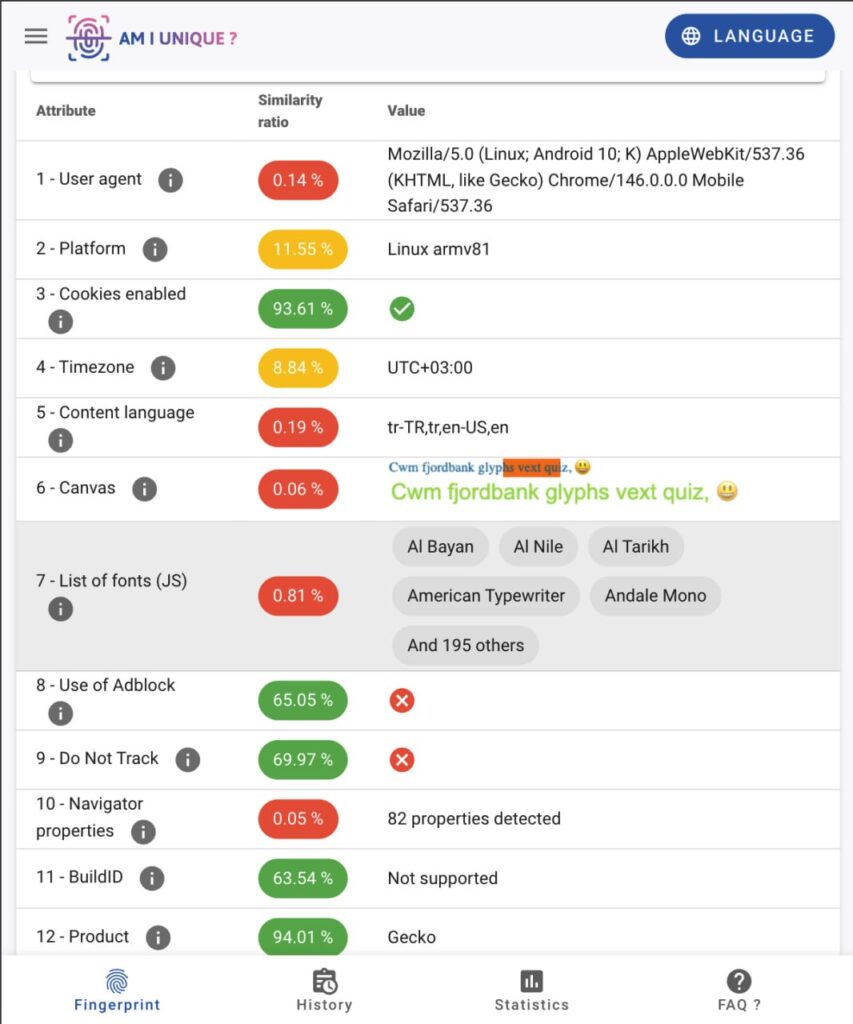
nullPrint: choose Phone (Android) as the OS at profile creation, pick a region (the IP is mapped to the matching country), and the backend assembles one coherent device — UA, model, Android version, screen/DPR, WebGL hardware, memory, and the Android font behavior — from a real-device database. The card shows the emulated model (e.g., Galaxy A15, Pixel 7) so you know exactly what each profile presents as.
AdsPower: select a mobile UA/device, and the platform applies its spoofing layer over the host browser. It looks correct in surface-level checks, but the host OS continues to drive font rasterization and other engine-level signals underneath — which is where the inconsistencies described above originate.
| Signal | AdsPower | nullPrint |
|---|---|---|
| Font metrics | Masks font list, but glyph rendering still follows host OS → metric mismatch possible | Fonts substituted inside engine → font list + glyph metrics stay coherent |
| Viewport / DPR | Overrides viewport values, window can exceed real screen size | Uses real CDP metrics → viewport, DPR, and screen dimensions stay aligned |
| Touch signals | Can be inconsistent depending on profile | maxTouchPoints=5, touch behavior enabled and coherent |
| UA Platform | May leak underlying host OS | Android platform forced at engine level |
| navigator.platform | Mostly string replacement | Proper Android/Linux ARM value (Linux armv81) |
| deviceMemory | Can expose unrealistic values (e.g. 16GB) | Capped to realistic Chrome mobile range (≤8GB) |
| WebGL | Often generic renderer or host GPU leakage | Realistic device-specific GPU (Mali / Adreno) |
| UA vs Device Model Consistency | Generic Android UA | UA, model, Android version, and hardware fingerprint come from the same device profile |